Common Fixes
Not hearing sound? Check your volume or refresh the page
Video cut out? Refresh the page or use the “Technical Issues” button to watch directly on vimeo
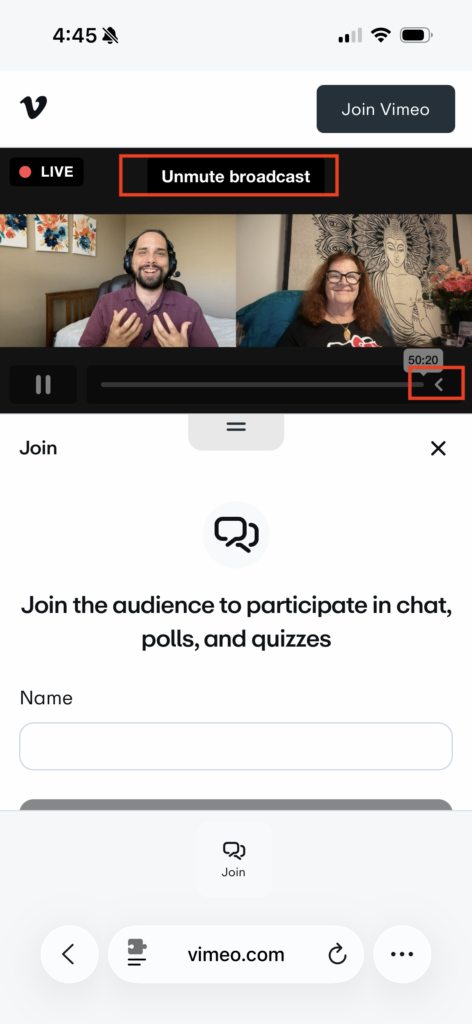
Mobile Issues/Controls – there is a collapsible settings triangle icon > on the main video screen. Click that to open additional options, including volume and closed captions.
Available Features for Mobile & Desktop
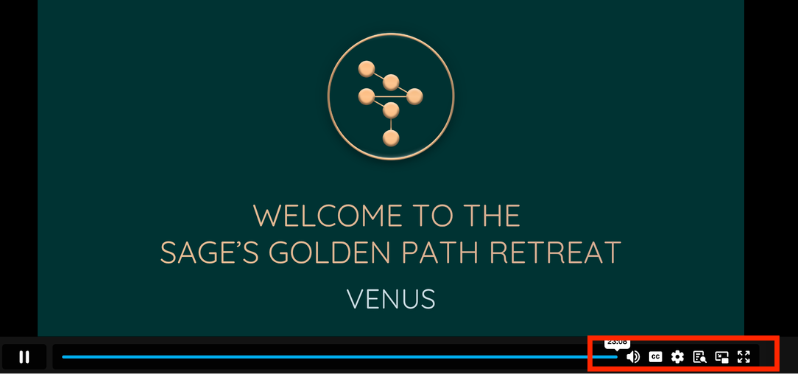
Use the available settings beneath the video screen to access these features
- Live Closed Captioning (English)
- Volume Controls
- Full Screen
- Adjust video resolution (defaults to automatic to adjust to your internet bandwidth, increase for higher resolution video)
- Optional Chat window to engage with others
- Some webinars also have a Q&A option
- Instant Replay AFTER the live broadcast (refresh the page)
About Chat
When using Vimeo Chat you do not need to login to Vimeo.
You absolutely can create and use a free vimeo login if you would like to save your own video preferences, but it is not required.
You can join any live webinar chat by clicking “Join Audience” and then typing your name to continue.
If the chat is scrolling by too quickly, don’t worry you can scroll up to view the chat at anytime.
The chat will remain open at the beginning and available for lingering at the end of the live event.
The chat room is entirely optional, and should not be a distraction for those who prefer to simply watch/listen. Click the chat icon to open or close the chat window at any time.
About Live Q&A
Webinars using the Vimeo platform will have limited access to a Q&A function.
You can always use the Chat box to ask questions, and our tech host will do their best to respond.
Some webinars will include an additional feature called Q&A. This allows our team to see the Questions more easily and answer them live on screen. These questions will be limited in length, so use your available words carefully. 🙂
Why Vimeo and not Zoom?
For the past year we have used a combination of Zoom and Vimeo for webinar platforms. It has been a way to provide a single view backup and instant replay option for participants, instead of being only limited to Zoom.
Zoom will still be used for interactive sessions including Community Call breakout rooms and live text Q&A for sessions like Decoding your Profile and Q&A Cafe with our hosts.
However, for the primary webinars that are less interactive in nature, we are instead using the Vimeo platform only.
Why are we making this shift? We have to balance integrating feedback from different types of users. Zoom had two really difficult features that we could not change –
- Slides being shared via Zoom were often too blurry to read
- The chat box would overwhelm/distract users when enabled as Zoom does not allow a user to “hide the chat” very easily
- Zoom had limitations in simultaneous viewers, limitations for people’s devices and hardware, and no instant replay option that we could implement. Vimeo provides an alternative solution to those issues.
Slideshows
Vimeo allows for higher quality screen sharing of slideshows, including live and instant replay. We are still working through the kinks with sharing materials in a readable way and appreciate your patience, but the Zoom option was not ideal.
We will always provide access to the slides in multiple formats AFTER the webinar concludes.
Chat Option
Different people have different preferences in terms to live chat during the webinars. Some people love this feature, and others feel much more distracted/annoyed by it.
We did not want to fully disable the chat option, as many people have reported feeling much more connected to community through that option. But we want it to be optional and not distract those who prefer to just listen and watch those webinars / transmissions from Richard.
The Vimeo option allows the chat to be voluntarily turned on and easily hidden, allowing for a distraction free experience.
It also allows for chat to start earlier and remain open later for lingering, which was not an option in the old webinar style.
Access & Instant Replay
For some users, they could not use Zoom at all due to platform challenges and device settings. We understand that is also an issue for Vimeo for some users, but no single platform will be available for all worldwide users.
Zoom has limitations to how many people can join webinars live. Instead of making a more complicated “overflow” system, we are instead leveraging the wider broadcast power of Vimeo directly.
With Vimeo we can provide an instant replay, which was a huge improvement since the beginning of this year. Previously, we would have to wait up to 24 hours for the replay to be processed and uploaded